AWS Step Functions
AWS Step Functions orchestrates AWS Lambda functions into a state machine. The sections below show how to deploy a Kedro project so each pipeline-level namespace runs as one Lambda function, with datasets stored on Amazon S3.
Step Functions fits Kedro pipelines that consist of pandas, scikit-learn, or other lightweight Python work that fits Lambda limits. For PySpark or long-running distributed workloads, use Amazon EMR Serverless or AWS Batch instead.
This guide targets Kedro 1.x (kedro>=1.0) and uses the Spaceflights starter as a worked example. Read the deployment strategy first if you are deploying your own Kedro project and need guidance on grouping, storage, and Lambda memory and timeout settings.
Strategy
Read this section before you deploy your own project. It starts with an overview of the approach, then gives practical advice for adapting it to your pipelines.
Overview
This guide deploys a Kedro pipeline as an AWS Step Functions state machine backed by Lambda functions and Amazon S3.
The approach in brief:
- Group nodes by pipeline-level namespace. Each group becomes one Lambda function. When Step Functions invokes it, the handler runs every node in that namespace with
session.run(namespaces=[...]). - Store shared datasets on S3. Lambda functions are isolated, so datasets that cross namespace boundaries cannot use
MemoryDataset. - Package the project as a Lambda container image. Every namespace group uses the same image.
- Build the state machine from your pipeline graph. A CDK deployment script reads your pipeline, creates one Lambda per namespace group, and wires them into Step Functions.
Why use a container image?
Container images for AWS Lambda functions lets you package Kedro, project dependencies, and configuration into one artefact. You can build and test that artefact locally before pushing it to Amazon Elastic Container Registry.
flowchart LR
  subgraph driver [Your machine]
    CDK[cdk deploy]
  end
  subgraph aws [AWS]
    SFN[Step Functions]
    L1[Lambda data_processing]
    P[Parallel state]
    L2[Lambda reporting]
    L3[Lambda data_science]
    S3[(S3 bucket)]
  end
  CDK --> SFN
  SFN --> L1
  L1 --> S3
  L1 --> P
  P --> L2
  P --> L3
  L2 --> S3
  L3 --> S3
For Spaceflights starter, this pattern creates three Lambda functions (data_processing, data_science, and reporting) instead of one per node.
Use pipeline-level namespaces (defined on the Pipeline object), not node-level namespaces. Node-level namespaces are for Kedro-Viz layout and do not group execution. See the section on grouping nodes with namespaces in Kedro for further explanation.
Choose how to group nodes
Namespace grouping suits most production pipelines where related nodes share dependencies and finish within Lambda limits.
| Grouping | Pros | Cons | When to use |
|---|---|---|---|
| One Lambda per namespace (recommended) | Fewer functions. Related nodes run together | Whole namespace must fit Lambda timeout and memory | Most production Spaceflights-style pipelines |
| One Lambda per node | Full isolation. Easy to debug a single node | More functions, cold starts, more Step Functions tasks | Small pipelines or prototyping |
| Offload heavy stages to Batch or EMR Serverless | Long jobs and large memory needs fit better | Extra infrastructure to set up and operate | Spark workloads or nodes that exceed Lambda limits |
When a namespace exceeds Lambda limits
If a namespace outgrows Lambda, run those stages on AWS Batch or Amazon EMR Serverless instead of Step Functions.
Plan execution order and storage
Namespace groups with no upstream dependencies run together in a Step Functions Parallel workflow state. Groups that depend on earlier outputs run after those groups finish. The state machine chains one Parallel block per dependency level, using the dependencies list on each GroupedNodes object from Pipeline.group_nodes_by("namespace").
For Spaceflights, data_processing pipeline runs at the first dependency level to produce intermediate datasets on S3. data_science and reporting pipelines run in parallel at the next level because both depend on data_processing outputs (model_input_table and preprocessed_shuttles) but not on each other. The same dependency rules apply in distributed Kedro runs and in grouping nodes for deployment.
List every dataset shared across namespace groups in conf/aws/catalog.yml on S3. Omitting a dataset causes MemoryDataset errors when Step Functions moves between Lambda invocations.
Configure before you deploy
- Assign pipeline-level namespaces with explicit
inputs/outputsandprefix_datasets_with_namespace=False - Run each namespace locally (
kedro run --namespaces=<name>) to estimate duration and memory, then setmemory_sizeandtimeout_minutesinNAMESPACE_LAMBDA_CONFIGin your CDK deployment script for the heaviest node in each namespace - Trim image dependencies if the container approaches Lambda size limits
Deploying without pipeline-level namespaces
If your project has no pipeline-level namespaces, you can still deploy with the same deploy.py and lambda_handler.py from this guide. Pipeline.group_nodes_by("namespace") treats each node without a namespace as its own group, so you get one Lambda per node. The handler runs session.run(node_names=[...]) for those groups instead of session.run(namespaces=[...]).
Working example
Prerequisites
These apply to the step-by-step guide below. This guide builds and deploys from your machine with Kedro, Docker, the AWS CDK, and the AWS CLI. You use the AWS Management Console to inspect the state machine and Lambda functions after deployment, but you cannot complete the guide with the console alone.
| You need | Used for |
|---|---|
A Kedro project (requires-python = ">=3.10" in pyproject.toml) and Python >=3.10 locally |
Packaging the project, local test runs, and the CDK script that reads your pipeline |
Docker (Podman also works if you have a docker-compatible CLI) |
Building the Lambda container image |
Node.js and the CDK CLI (npm install -g aws-cdk) |
Deploying Lambda functions and the Step Functions state machine with deploy.py |
| AWS CLI configured for your target region | Uploading data to S3, pushing the image to ECR, starting executions, and verifying outputs |
| An AWS account with permissions for S3, ECR, Lambda, Step Functions, IAM, and CloudFormation | Creating and running the deployed resources |
The steps that follow deploy the Spaceflights starter end to end. Create the project with:
kedro new -s spaceflights-pandas -n spaceflights_step_functions
If you are new to the project layout, complete the Spaceflights tutorial. If you use your own Kedro project, replace the placeholders below and follow the same steps.
Placeholders used in this guide
Replace these before building and deploying:
| Placeholder | Example |
|---|---|
<your-bucket> |
kedro-sfn-test-123456789012 |
<your-aws-account-id> |
123456789012 |
<your-aws-region> |
us-east-1 |
<PACKAGE_NAME> |
spaceflights_step_functions |
<ecr-image-uri> |
123456789012.dkr.ecr.us-east-1.amazonaws.com/spaceflights-step-functions:latest |
What you will do
- Prepare your Kedro project
- Set up AWS
- Configure Kedro for AWS
- Create the Lambda handler
- Write the CDK deployment script
- Package, build, and push the container image
- Deploy with CDK
- Run the state machine
- Verify outputs on S3
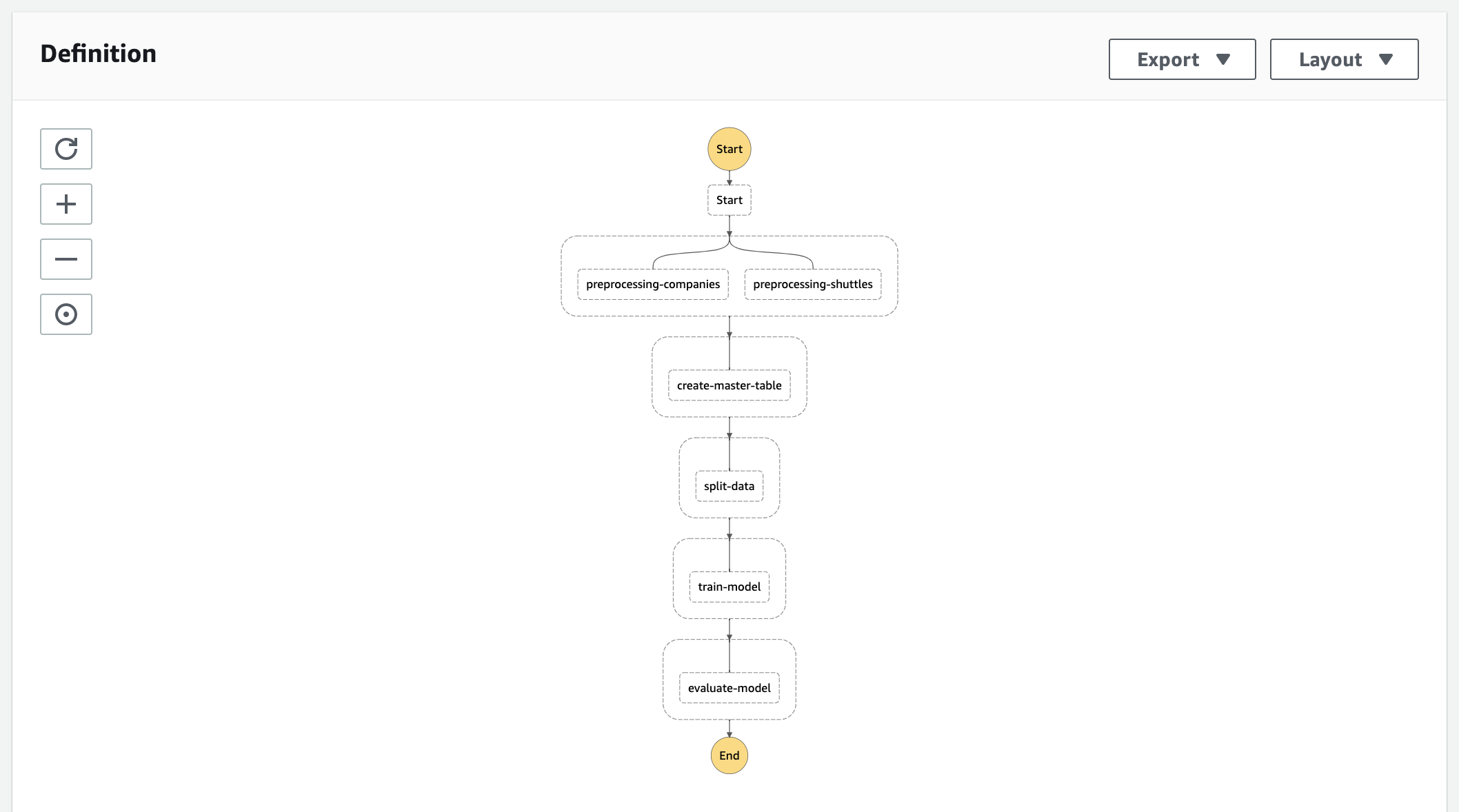
The deployed state machine looks like this in the AWS Management Console:
Step 1: Prepare your Kedro project
From the project root, install dependencies and run the pipeline locally:
pip install -e .
kedro run
Keep conf/base/catalog.yml on local file paths for local development. You add S3 paths in Step 3 after you create the bucket in Step 2.
Assign pipeline-level namespaces
This step is recommended for fewer Lambda functions and lower orchestration overhead. Read the deployment strategy for grouping trade-offs and namespace requirements. If your pipeline has no pipeline-level namespaces, skip to Step 2: Set up AWS.
Assign a pipeline-level namespace to each sub-pipeline you want to run as one Lambda function. In Spaceflights, update create_pipeline() in each module under src/<PACKAGE_NAME>/pipelines/:
def create_pipeline(**kwargs) -> Pipeline:
    return Pipeline(
        [
            # ... nodes unchanged ...
        ],
        namespace="data_processing",
        prefix_datasets_with_namespace=False,
        inputs={"companies", "shuttles", "reviews"},
        outputs={"model_input_table"},
    )
Set prefix_datasets_with_namespace=False so dataset names in conf/base/catalog.yml and conf/aws/catalog.yml keep their original names (for example model_input_table, not data_processing.model_input_table). Declare explicit inputs and outputs for each namespace so datasets shared across Lambda functions keep the same names.
Repeat for the other sub-pipelines in __default__:
| Sub-pipeline | namespace |
inputs |
outputs |
|---|---|---|---|
data_science |
data_science |
{"model_input_table"} |
{"regressor", "X_train", "X_test", "y_train", "y_test"} |
reporting |
reporting |
{"preprocessed_shuttles"} |
{"shuttle_passenger_capacity_plot_exp", "shuttle_passenger_capacity_plot_go", "dummy_confusion_matrix"} |
Learn how to group nodes with namespaces in Kedro using the full Spaceflights example.
Update conf/base/catalog.yml for reporting
If the starter lists matplotlib.MatplotlibWriter for the confusion matrix output, change it to matplotlib.MatplotlibDataset in conf/base/catalog.yml before running locally. In Spaceflights the catalog entry is named dummy_confusion_matrix. The aws catalog in Step 3 already uses MatplotlibDataset.
Verify locally after adding namespaces:
kedro run --namespaces=data_processing
kedro run
Step 2: Set up AWS
Create the AWS resources your Kedro project will use before you point configuration at them. Complete this setup for each AWS account and region.
Create an S3 bucket and upload raw data
Create a globally unique bucket and upload the raw datasets. Follow the AWS guides for creating an Amazon S3 bucket and uploading objects to Amazon S3:
export AWS_ACCOUNT_ID=<your-aws-account-id>
export AWS_REGION=<your-aws-region>
export S3_BUCKET=<your-bucket>

aws s3 mb "s3://${S3_BUCKET}" --region "${AWS_REGION}"
aws s3 sync data/01_raw/ "s3://${S3_BUCKET}/01_raw/"
shuttles.xlsx may be missing locally
The starter gitignores data/01_raw/shuttles.xlsx. Copy it from the Spaceflights starter repository on GitHub if kedro new did not place it in your project.
Create an ECR repository
| Resource | AWS documentation | What you need for Kedro |
|---|---|---|
| ECR repository | Create a private Amazon ECR repository | One private repo for the Lambda image (for example spaceflights-step-functions) |
| CDK bootstrap | Bootstrap AWS CDK in your account | One-time per account/region before cdk deploy in Step 7 |
| IAM | Created by CDK | Lambda execution roles and Step Functions permissions are provisioned by the CDK stack |
Create the ECR repository:
export ECR_REPO=spaceflights-step-functions

aws ecr create-repository --repository-name "${ECR_REPO}" --region "${AWS_REGION}"
Keep AWS_ACCOUNT_ID, AWS_REGION, S3_BUCKET, and ECR_REPO exported for later steps.
Step 3: Configure Kedro for AWS
Set s3_bucket in conf/aws/globals.yml to the same value as S3_BUCKET from Step 2.
Create an aws config environment
Add conf/aws/ with a globals.yml file and a catalog.yml that points every dataset to S3. Use catalog globals to define the S3 bucket name in one place.
conf/aws/globals.yml:
s3_bucket: <your-bucket>
Catalog environment merge is destructive
By default, Kedro merges configuration environments at the top level. If conf/aws/catalog.yml overrides a dataset using filepath alone, it replaces the entire dataset entry from conf/base/ and drops keys such as type. Either include the full dataset definition (including type) in conf/aws/catalog.yml, or set merge_strategy: {catalog: soft} in settings.py so environment files can override individual fields.
Every shared dataset needs S3 storage
The aws catalog must list every dataset used by the deployed pipeline, including intermediate outputs such as X_train, X_test, y_train, and y_test, and reporting artefacts. Omitting a dataset causes MemoryDataset errors when Step Functions moves between Lambda invocations.
Add s3fs to project dependencies
When datasets read from s3:// paths, add s3fs to pyproject.toml:
"s3fs>=2024.6.0"
The Spaceflights starter uses Parquet for intermediate tables and includes a reporting pipeline.
View conf/aws/catalog.yml
companies:
  type: pandas.CSVDataset
  filepath: s3://${globals:s3_bucket}/01_raw/companies.csv

reviews:
  type: pandas.CSVDataset
  filepath: s3://${globals:s3_bucket}/01_raw/reviews.csv

shuttles:
  type: pandas.ExcelDataset
  filepath: s3://${globals:s3_bucket}/01_raw/shuttles.xlsx
  load_args:
    engine: openpyxl

preprocessed_companies:
  type: pandas.ParquetDataset
  filepath: s3://${globals:s3_bucket}/02_intermediate/preprocessed_companies.parquet

preprocessed_shuttles:
  type: pandas.ParquetDataset
  filepath: s3://${globals:s3_bucket}/02_intermediate/preprocessed_shuttles.parquet

model_input_table:
  type: pandas.ParquetDataset
  filepath: s3://${globals:s3_bucket}/03_primary/model_input_table.parquet

X_train:
  type: pickle.PickleDataset
  filepath: s3://${globals:s3_bucket}/04_feature/X_train.pickle

X_test:
  type: pickle.PickleDataset
  filepath: s3://${globals:s3_bucket}/04_feature/X_test.pickle

y_train:
  type: pickle.PickleDataset
  filepath: s3://${globals:s3_bucket}/04_feature/y_train.pickle

y_test:
  type: pickle.PickleDataset
  filepath: s3://${globals:s3_bucket}/04_feature/y_test.pickle

regressor:
  type: pickle.PickleDataset
  filepath: s3://${globals:s3_bucket}/06_models/regressor.pickle
  versioned: true

shuttle_passenger_capacity_plot_exp:
  type: plotly.PlotlyDataset
  filepath: s3://${globals:s3_bucket}/08_reporting/shuttle_passenger_capacity_plot_exp.json
  versioned: true
  plotly_args:
    type: bar
    fig:
      x: shuttle_type
      y: passenger_capacity
      orientation: h
    layout:
      xaxis_title: Shuttles
      yaxis_title: Average passenger capacity
      title: Shuttle Passenger capacity

shuttle_passenger_capacity_plot_go:
  type: plotly.JSONDataset
  filepath: s3://${globals:s3_bucket}/08_reporting/shuttle_passenger_capacity_plot_go.json
  versioned: true

dummy_confusion_matrix:
  type: matplotlib.MatplotlibDataset
  filepath: s3://${globals:s3_bucket}/08_reporting/dummy_confusion_matrix.png
  versioned: true
Verify the AWS environment locally
kedro run --env aws
Confirm outputs appear under your S3 bucket paths.
Step 4: Create the Lambda handler
Create lambda_handler.py in the project root. Each Lambda invocation runs every node in the namespace named in the event payload.
Use configure_project inside Lambda
Call configure_project("<PACKAGE_NAME>") in the handler, not bootstrap_project(). The packaged wheel is installed into the container; bootstrap_project() expects pyproject.toml and a src/ tree that are not copied into the image.
from pathlib import Path
from unittest.mock import patch


def handler(event, context):
    """AWS Lambda entrypoint that runs a Kedro namespace group."""
    from kedro.framework.project import configure_project
    from kedro.framework.session import KedroSession

    project_path = Path(__file__).resolve().parent

    # SemLock is not available on Lambda; mock it so Kedro can import safely.
    with patch("multiprocessing.Lock"):
        configure_project("spaceflights_step_functions")
        with KedroSession.create(
            project_path=project_path,
            env="aws",
            conf_source=str(project_path / "conf"),
        ) as session:
            if "namespace" in event:
                session.run(namespaces=[event["namespace"]])
            else:
                session.run(node_names=[event["node_name"]])
Replace spaceflights_step_functions with your package name if you used a different starter.
Step 5: Write the CDK deployment script
Create the CDK deployment files before you build the container image. The stack references the ECR repository from Step 2. Push the image in Step 6 before you run cdk deploy in Step 7.
Install CDK Python dependencies into the same environment as your Kedro project:
deploy_requirements.txt:
aws-cdk-lib>=2.170.0
constructs>=10.0.0
pip install -r deploy_requirements.txt
Create deploy.py in your project root. It groups your pipeline by namespace, creates one Lambda function per group, and wires them into a Step Functions state machine.
Before you deploy, set s3_data_bucket_name to your bucket from Step 2. Adjust NAMESPACE_LAMBDA_CONFIG from local run times or CloudWatch metrics so each namespace fits its heaviest node.
The example sets ecr_repository_name = project_path.name, so your project directory name must match the ECR repository name from Step 2 (for example spaceflights-step-functions).
View deploy.py
import re
from pathlib import Path

import aws_cdk as cdk
from aws_cdk import (
    Duration,
    Stack,
    aws_ecr as ecr,
    aws_lambda as lambda_,
    aws_s3 as s3,
    aws_stepfunctions as sfn,
    aws_stepfunctions_tasks as tasks,
)
from constructs import Construct
from kedro.framework.project import pipelines
from kedro.framework.startup import bootstrap_project
from kedro.pipeline.node import GroupedNodes


def _clean_name(name: str) -> str:
    """Reformat a name to be compliant with AWS naming rules."""
    return re.sub(r"[\W_]+", "-", name).strip("-")[:63]


def _namespace_dependency_levels(
    groups: list[GroupedNodes],
) -> list[list[GroupedNodes]]:
    """Return namespace groups grouped by dependency level for Step Functions."""
    group_map = {group.name: group for group in groups}
    done: set[str] = set()
    dependency_levels: list[list[GroupedNodes]] = []

    while len(done) < len(group_map):
        ready_names = [
            name
            for name, group in group_map.items()
            if name not in done
            and all(dep in done for dep in group.dependencies)
        ]
        if not ready_names:
            raise ValueError("Circular dependencies among namespace groups")
        dependency_levels.append([group_map[name] for name in ready_names])
        done.update(ready_names)

    return dependency_levels


# Size each namespace Lambda for its heaviest node (from local runs or CloudWatch).
NAMESPACE_LAMBDA_CONFIG: dict[str, dict[str, int]] = {
    "data_processing": {"memory_size": 512, "timeout_minutes": 5},
    "data_science": {"memory_size": 2048, "timeout_minutes": 15},
    "reporting": {"memory_size": 1024, "timeout_minutes": 10},
}
DEFAULT_LAMBDA_CONFIG = {"memory_size": 1024, "timeout_minutes": 15}


class KedroStepFunctionsStack(Stack):
    """A CDK stack that deploys a Kedro pipeline to AWS Step Functions."""

    env_name = "aws"
    project_path = Path.cwd()
    ecr_repository_name = project_path.name
    s3_data_bucket_name = "<your-bucket>"

    def __init__(self, scope: Construct, construct_id: str, **kwargs) -> None:
        super().__init__(scope, construct_id, **kwargs)

        self._parse_kedro_pipeline()
        self._set_ecr_repository()
        self._set_ecr_image()
        self._set_s3_data_bucket()
        self._convert_kedro_pipeline_to_step_functions_state_machine()

    def _parse_kedro_pipeline(self) -> None:
        """Extract the Kedro pipeline from the project"""
        metadata = bootstrap_project(self.project_path)

        self.project_name = metadata.project_name
        self.pipeline = pipelines["__default__"]

    def _set_ecr_repository(self) -> None:
        """Set the ECR repository for the Lambda base image"""
        self.ecr_repository = ecr.Repository.from_repository_name(
            self, id="ECR", repository_name=self.ecr_repository_name
        )

    def _set_ecr_image(self) -> None:
        """Set the Lambda base image"""
        self.ecr_image = lambda_.EcrImageCode.from_ecr_image(
            repository=self.ecr_repository, tag_or_digest="latest"
        )

    def _set_s3_data_bucket(self) -> None:
        """Set the S3 bucket containing the raw data"""
        self.s3_bucket = s3.Bucket.from_bucket_name(
            self, "RawDataBucket", self.s3_data_bucket_name
        )

    def _convert_group_to_lambda_function(
        self, group: GroupedNodes
    ) -> lambda_.Function:
        """Convert a namespace group into an AWS Lambda function"""
        config = self.NAMESPACE_LAMBDA_CONFIG.get(
            group.name, self.DEFAULT_LAMBDA_CONFIG
        )
        func = lambda_.Function(
            self,
            id=_clean_name(f"{group.name}_fn"),
            description=", ".join(group.nodes),
            code=self.ecr_image,
            handler=lambda_.Handler.FROM_IMAGE,
            runtime=lambda_.Runtime.FROM_IMAGE,
            environment={
                "S3_BUCKET": self.s3_data_bucket_name,
                "MPLCONFIGDIR": "/tmp/matplotlib",
            },
            function_name=_clean_name(group.name),
            memory_size=config["memory_size"],
            timeout=Duration.minutes(config["timeout_minutes"]),
        )
        self.s3_bucket.grant_read_write(func)
        return func

    def _convert_group_to_sfn_task(
        self, group: GroupedNodes, func: lambda_.Function
    ) -> tasks.LambdaInvoke:
        """Convert a namespace group into an AWS Step Functions Task"""
        if group.type == "namespace":
            payload = {"namespace": group.name}
        else:
            payload = {"node_name": group.nodes[0]}

        return tasks.LambdaInvoke(
            self,
            _clean_name(group.name),
            lambda_function=func,
            payload=sfn.TaskInput.from_object(payload),
        )

    def _convert_kedro_pipeline_to_step_functions_state_machine(self) -> None:
        """Convert Kedro pipeline into an AWS Step Functions State Machine"""
        groups = self.pipeline.group_nodes_by("namespace")
        dependency_levels = _namespace_dependency_levels(groups)
        lambdas = {
            group.name: self._convert_group_to_lambda_function(group)
            for group in groups
        }

        definition = sfn.Pass(self, "Start")

        for index, level in enumerate(dependency_levels, start=1):
            parallel_state = sfn.Parallel(self, f"Dependency level {index}")
            for group in level:
                parallel_state.branch(
                    self._convert_group_to_sfn_task(group, lambdas[group.name])
                )
            definition = definition.next(parallel_state)

        sfn.StateMachine(
            self,
            self.project_name,
            definition=definition,
            timeout=Duration.minutes(60),
        )


app = cdk.App()
KedroStepFunctionsStack(app, "KedroStepFunctionsStack")
app.synth()
Register the app with CDK by creating cdk.json:
{
  "app": "python deploy.py"
}
Match the Python interpreter in cdk.json
deploy.py calls bootstrap_project() and needs both Kedro and aws-cdk-lib installed. If your system python3 differs from the environment where you installed dependencies, point app at that interpreter (for example .venv/bin/python deploy.py).
Step 6: Package, build, and push the container image
Package the project, then build and push the Lambda image. Repeat this step when you change pipeline code, dependencies, conf/aws/, or lambda_handler.py.
Run this in your project root:
kedro package
This creates dist/spaceflights_step_functions-0.1-py3-none-any.whl (the exact filename depends on your package version). Learn how to package a Kedro project.
Create a Dockerfile in your project root:
FROM public.ecr.aws/lambda/python:3.12

COPY lambda_handler.py ${LAMBDA_TASK_ROOT}/
COPY conf/ ${LAMBDA_TASK_ROOT}/conf/

COPY dist/*.whl /tmp/
RUN pip install --no-cache-dir /tmp/*.whl --target "${LAMBDA_TASK_ROOT}" \
    && rm -f /tmp/*.whl

CMD ["lambda_handler.handler"]
Apple Silicon (ARM) builders
Lambda functions use x86_64 by default. Build with --platform linux/amd64 (Docker or Podman) or invocations may fail with Runtime.InvalidEntrypoint / ProcessSpawnFailed.
Build the image. Tag it with your ECR URI at build time so the image you push is the one you built:
export ECR_IMAGE=<ecr-image-uri>

docker build --platform linux/amd64 -t ${ECR_IMAGE} .
If you build with a local tag (for example spaceflights-step-functions), run docker tag spaceflights-step-functions:latest <ecr-image-uri> right before pushing.
How config reaches Lambda
Now that you have built the image, here is how your Step 3 configuration reaches Lambda at runtime:
- The wheel carries pipeline code.
kedro packagebundles your pipeline code and dependencies into a.whlfile. It does not includeconf/. - The
Dockerfilecarriesconf/.COPY conf/places yourconf/aws/settings at${LAMBDA_TASK_ROOT}/confinside the container image. - The handler selects the
awsenvironment.lambda_handler.pypassesconf_source=str(project_path / "conf")andenv="aws"toKedroSession.create(), so Lambda loadsconf/aws/catalog.ymlat runtime.
Push to ECR
Follow the AWS guide for pushing a Docker image to an Amazon ECR repository:
aws ecr get-login-password --region <your-aws-region> | \
  docker login --username AWS --password-stdin <your-aws-account-id>.dkr.ecr.<your-aws-region>.amazonaws.com
docker push ${ECR_IMAGE}
Re-push after handler or catalog changes
When you change lambda_handler.py, conf/aws/, or rebuild the wheel, repeat Step 6 and push a new image tag. If you already deployed in Step 7, run aws lambda update-function-code --image-uri <ecr-image-uri> on each image-based function, or redeploy with cdk deploy.
Step 7: Deploy with CDK
Complete Step 6 first so your ECR repository contains the image. The CDK stack creates Lambdas that reference the latest tag in that repository.
Bootstrap CDK in your account (first time per account/region) and deploy the stack. Follow the AWS CDK bootstrapping guide:
cdk bootstrap "aws://<your-aws-account-id>/<your-aws-region>"
cdk deploy
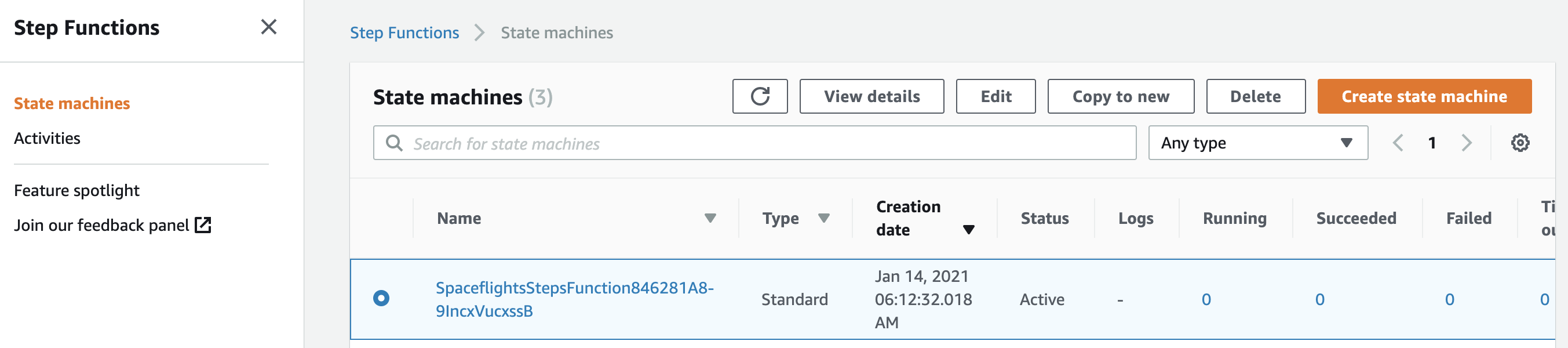
After deployment, open the AWS Step Functions console to see the state machine:
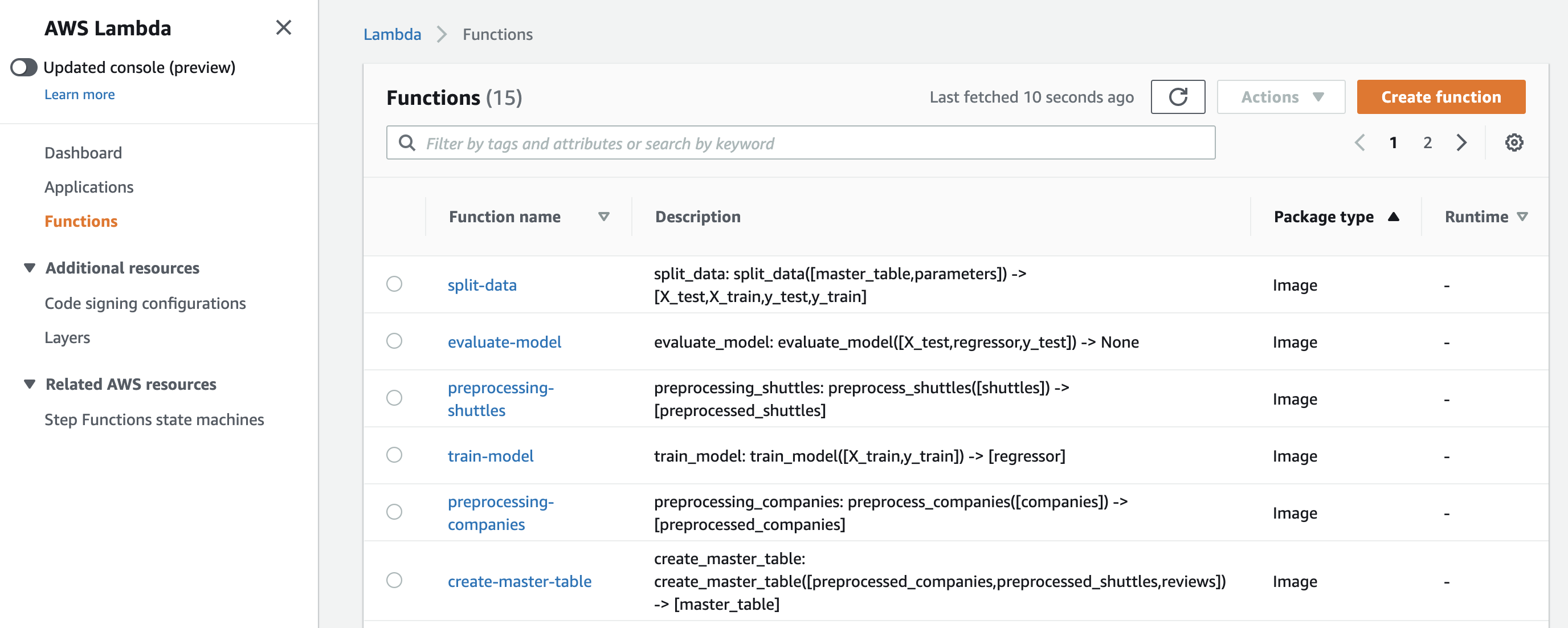
You will also see one Lambda function per pipeline-level namespace (three for Spaceflights __default__):
The CloudFormation stack KedroStepFunctionsStack should reach CREATE_COMPLETE.
Step 8: Run the state machine
Start a state machine execution from the AWS Step Functions console or with the AWS CLI. Follow the AWS guide for starting a state machine execution:
STATE_MACHINE_ARN=$(aws stepfunctions list-state-machines \
  --query "stateMachines[?contains(name, 'spaceflights')].stateMachineArn | [0]" \
  --output text)

aws stepfunctions start-execution \
  --state-machine-arn "${STATE_MACHINE_ARN}" \
  --name "kedro-run-$(date +%s)"
Poll until the execution status is SUCCEEDED.
Step 9: Verify outputs on S3
Check S3 outputs. List the output paths from your conf/aws/catalog.yml. Follow the AWS guide for listing objects in an S3 bucket:
aws s3 ls "s3://<your-bucket>/" --recursive
You should see objects under 02_intermediate/, 03_primary/, 04_feature/, 06_models/, and 08_reporting/.
If the execution failed, see Troubleshooting.
Troubleshooting
| Symptom | Cause | Fix |
|---|---|---|
Runtime.InvalidEntrypoint / ProcessSpawnFailed |
Container image built for ARM (Apple Silicon) but Lambda runs x86_64 | Rebuild with docker build --platform linux/amd64 and push again |
Could not find pyproject.toml in /var/task |
bootstrap_project called inside Lambda |
Use configure_project("<package_name>") in lambda_handler.py as shown in Step 4 |
Dataset 'MatplotlibWriter' not found |
Outdated dataset type in conf/base/catalog.yml or conf/aws/catalog.yml |
Use matplotlib.MatplotlibDataset in both catalogs (Kedro Datasets 3.x+) |
MemoryDataset errors between namespace groups |
Dataset not listed in conf/aws/catalog.yml |
Add an S3-backed entry for every dataset shared across Lambda invocations |
S3 errors during kedro run --env aws locally |
Missing AWS CRT support in botocore |
Run pip install 'botocore[crt]' and retry |
cdk deploy fails or creates unexpected Lambdas |
An older per-node stack is still deployed | Run cdk destroy, then cdk deploy again after switching to namespace grouping |
| Lambda times out mid-namespace | Namespace contains too much work for one 15-minute invocation | Increase timeout_minutes for that namespace in NAMESPACE_LAMBDA_CONFIG, split the namespace, or run heavy nodes on AWS Batch or Amazon EMR Serverless |
| Step Functions times out | State machine timeout too short for your pipeline | Increase timeout=Duration.minutes(...) in deploy.py |
| Lambda out of memory | Default memory too low for modelling nodes | Increase memory_size for that namespace in NAMESPACE_LAMBDA_CONFIG |
ModuleNotFoundError: No module named 'aws_cdk' |
CDK dependencies not installed in the Python env used by cdk.json |
Install deploy_requirements.txt in that environment, or update cdk.json to point at the correct interpreter |
Limitations
- Lambda limits: Each invocation has a 15-minute timeout, a 10 GB memory limit, and a 10 GB container image limit. Namespace grouping runs every node in a namespace in one invocation, so the whole namespace must fit within those limits.
- Step Functions timeout: The state machine has its own timeout, separate from Lambda. The example
deploy.pysets a 60-minute state machine timeout; increase it if your pipeline needs longer end-to-end runtime. - Not for Spark: This pattern is for non-distributed Python stages. Run PySpark workloads on Amazon EMR Serverless instead.
- Image lifecycle: When you change
lambda_handler.py,conf/aws/, or rebuild the wheel, repeat Step 6 and update each Lambda function. - Heavy stages: If a namespace outgrows Lambda, split it further or run those stages on AWS Batch or Amazon EMR Serverless.
Image size with the full Spaceflights starter
The Spaceflights starter includes Jupyter, Viz, and reporting dependencies that increase image size. For production deployments, consider trimming pyproject.toml dependencies to what your pipeline requires.
Further reading
Kedro
- Learn how to run Kedro in a distributed environment
- Learn how to group nodes for deployment
- Learn how to group nodes with namespaces in Kedro
- Learn how to package a Kedro project
- Learn how to run a packaged Kedro project
- Learn how to use catalog globals in Kedro configuration
- Learn how to manage Kedro sessions and lifecycle